Managing Members of a Group table
The Managing Members of a Group table displays the list of members of the group who activated a code for an account in the simulation, either the Bourstad Challenge or a private simulation.
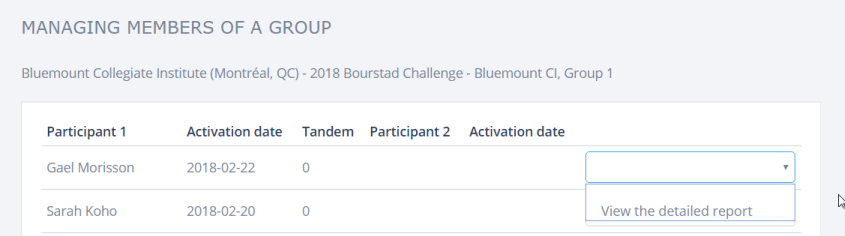
The columns in this table are:
- Participant 1. The first student who created the account using an activation code. If the account is not a tandem account, it is the only account holder
- Activation Date. Date of activation of the account by Participant 1.
- Tandem. Takes a value of 1 for a for a tandem account and 0 for an individual accountNote: tandem accounts may only exist for the Bourstad Challenge.
- Participant 2. Name of the second student who activated the account, for a tandem account
- Activation Date. Date when Participant 2 joined a tandem account.
- Untitled column Action that can be performed on each participant: view to the detailed report.