Tracking the distribution of a notification
After issuing a notification to participants in a simulation, school officials can view a table with information about the participants who viewed that communication.
When an institutional head or group supervisor displays a notification that he or she has sent to the participants of a simulation, a table appears at the bottom of the notification to inform about its consultation by the targeted persons.
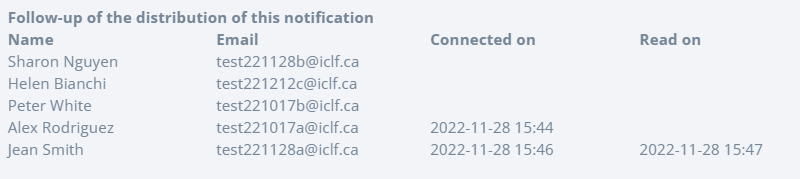
On this image, we can see that the notification targets 6 participants. Since the notification was issued, two of these participants have logged on to the Bourstad platform, Alex Rodriguez and Jean Smith. Only Jean Smith effectively viewed the notification during a work session on the Bourstad platform.